Examples
The examples/ folder of the repository has
runnable scripts. Each starts with a docstring that says what it shows. They all use the sample rocket
that comes with orhelper, so they run as they are. A script that needs extra packages says so
in the table below; pip install "orhelper[examples]" installs matplotlib and scipy.
All of them are run against real OpenRocket versions by the project's tests, so they keep working.
| Example | What it shows | Extra packages |
|---|---|---|
tour.ipynb |
A guided notebook: run, plot, change launch conditions and components, pandas, listeners | jupyter, matplotlib |
quickstart.py |
Run a simulation, print apogee, max velocity and events. Walkthrough | none |
events_and_stats.py |
An event table with altitudes, OpenRocket's summary statistics, the landing distance. Guide | none |
edit_and_save.py |
Change a component and the launch conditions, compare, save a new .ork. Guide |
none |
parameter_sweep.py |
Sweep the wind speed and the launch angle and write a CSV file | none |
multistage.py |
Read the data and events of each branch of a multistage rocket | none |
custom_listener.py |
Run Python code at every simulation step. Guide | none |
parallel_runs.py |
Run simulations in parallel, one JVM per worker process. Guide | none |
custom_setup.py |
Explicit jar, jvm_args and log settings; handling startup errors. Guide |
none |
simple_plot.py |
Plot altitude and velocity with annotated events | matplotlib |
lazy.py |
Find the launch angle that minimises drift with scipy.optimize |
matplotlib, scipy |
monte_carlo.py |
Randomise launch angle, wind and masses; custom listeners; landing-zone statistics | none |
A plot
simple_plot.py plots the altitude and the vertical velocity of a flight and marks the events:
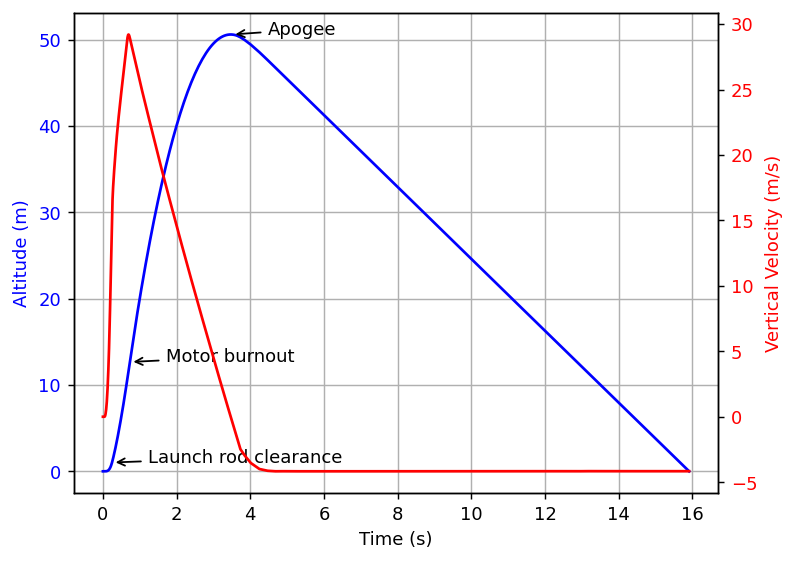
examples/simple_plot.py
import numpy as np
from matplotlib import pyplot as plt

import orhelper
from orhelper import FlightDataType, FlightEvent

with orhelper.OpenRocketInstance() as instance:
    orh = orhelper.Helper(instance)

    # Load document, run simulation and get data and events

    doc = orh.load_doc(orhelper.sample_ork_path())
    sim = doc.getSimulation(0)
    orh.run_simulation(sim)
    data = orh.get_timeseries(sim, [FlightDataType.TYPE_TIME, FlightDataType.TYPE_ALTITUDE, FlightDataType.TYPE_VELOCITY_Z])
    events = orh.get_events(sim)

    # Make a custom plot of the simulation

    events_to_annotate = {
        FlightEvent.BURNOUT: 'Motor burnout',
        FlightEvent.APOGEE: 'Apogee',
        FlightEvent.LAUNCHROD: 'Launch rod clearance'
    }

    fig = plt.figure()
    ax1 = fig.add_subplot(111)
    ax2 = ax1.twinx()

    ax1.plot(data[FlightDataType.TYPE_TIME], data[FlightDataType.TYPE_ALTITUDE], 'b-')
    ax2.plot(data[FlightDataType.TYPE_TIME], data[FlightDataType.TYPE_VELOCITY_Z], 'r-')
    ax1.set_xlabel('Time (s)')
    ax1.set_ylabel('Altitude (m)', color='b')
    ax2.set_ylabel('Vertical Velocity (m/s)', color='r')
    change_color = lambda ax, col: [x.set_color(col) for x in ax.get_yticklabels()]
    change_color(ax1, 'b')
    change_color(ax2, 'r')

    index_at = lambda t: (np.abs(data[FlightDataType.TYPE_TIME] - t)).argmin()
    for event, times in events.items():
        if event not in events_to_annotate:
            continue
        for time in times:
            ax1.annotate(events_to_annotate[event], xy=(time, data[FlightDataType.TYPE_ALTITUDE][index_at(time)]),
                         xycoords='data', xytext=(20, 0), textcoords='offset points',
                         arrowprops=dict(arrowstyle="->", connectionstyle="arc3"))

    ax1.grid(True)

# Leave OpenRocketInstance context before showing plot in order to shutdown JVM first
plt.show()
More
More background, from the community, is on the OpenRocket wiki.